Developer Guide
- Acknowledgements
- Setting up, getting started
- Design
- Implementation
- Documentation, logging, testing, configuration, dev-ops
- Appendix: Requirements
- Appendix: Instructions for manual testing
Acknowledgements
- {list here sources of all reused/adapted ideas, code, documentation, and third-party libraries – include links to the original source as well}
Setting up, getting started
Refer to the guide Setting up and getting started.
Design
 Tip: The
 .puml files used to create diagrams in this document can be found in the diagrams folder. Refer to the PlantUML Tutorial at se-edu/guides to learn how to create and edit diagrams.
Architecture
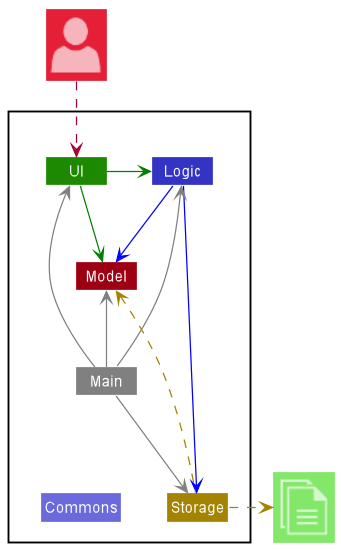
The Architecture Diagram given above explains the high-level design of the App.
Given below is a quick overview of main components and how they interact with each other.
Main components of the architecture
Main has two classes called Main and MainApp. It is responsible for,
- At app launch: Initializes the components in the correct sequence, and connects them up with each other.
- At shut down: Shuts down the components and invokes cleanup methods where necessary.
Commons represents a collection of classes used by multiple other components.
The rest of the App consists of four components.
-
UI: The UI of the App. -
Logic: The command executor. -
Model: Holds the data of the App in memory. -
Storage: Reads data from, and writes data to, the hard disk.
How the architecture components interact with each other
The Sequence Diagram below shows how the components interact with each other for the scenario where the user issues the command delete 1.
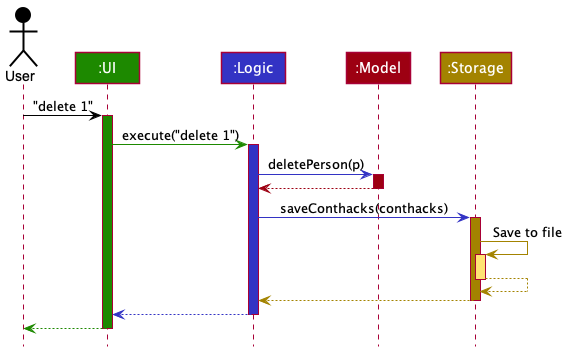
Each of the four main components (also shown in the diagram above),
- defines its API in an
interfacewith the same name as the Component. - implements its functionality using a concrete
{Component Name}Managerclass (which follows the corresponding APIinterfacementioned in the previous point.
For example, the Logic component defines its API in the Logic.java interface and implements its functionality using the LogicManager.java class which follows the Logic interface. Other components interact with a given component through its interface rather than the concrete class (reason: to prevent outside component’s being coupled to the implementation of a component), as illustrated in the (partial) class diagram below.
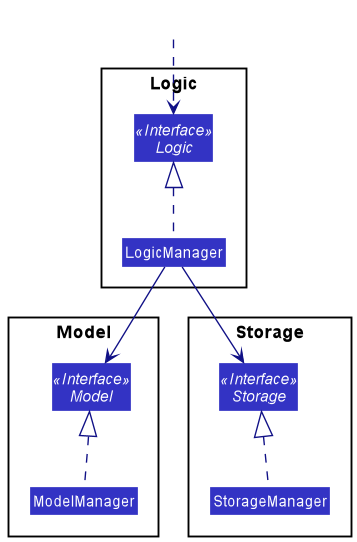
The sections below give more details of each component.
UI component
The API of this component is specified in Ui.java
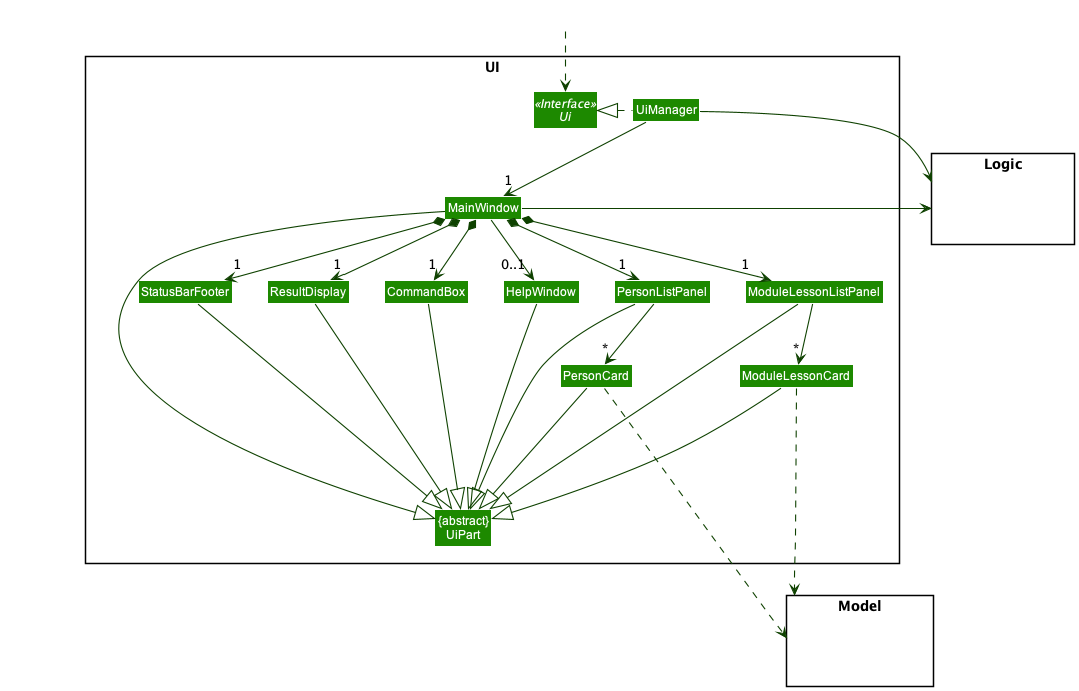
The UI consists of a MainWindow that is made up of parts e.g.CommandBox, ResultDisplay, PersonListPanel, ModuleLessonListPanel, StatusBarFooter etc. All these, including the MainWindow, inherit from the abstract UiPart class which captures the commonalities between classes that represent parts of the visible GUI.
The UI component uses the JavaFx UI framework. The layout of these UI parts are defined in matching .fxml files that are in the src/main/resources/view folder. For example, the layout of the MainWindow is specified in MainWindow.fxml
The UI component,
- executes user commands using the
Logiccomponent. - listens for changes to
Modeldata so that the UI can be updated with the modified data. - keeps a reference to the
Logiccomponent, because theUIrelies on theLogicto execute commands. - depends on some classes in the
Modelcomponent, as it displaysPersonandModuleLessonobjects residing in theModel.
Logic component
API : Logic.java
Here’s a (partial) class diagram of the Logic component:
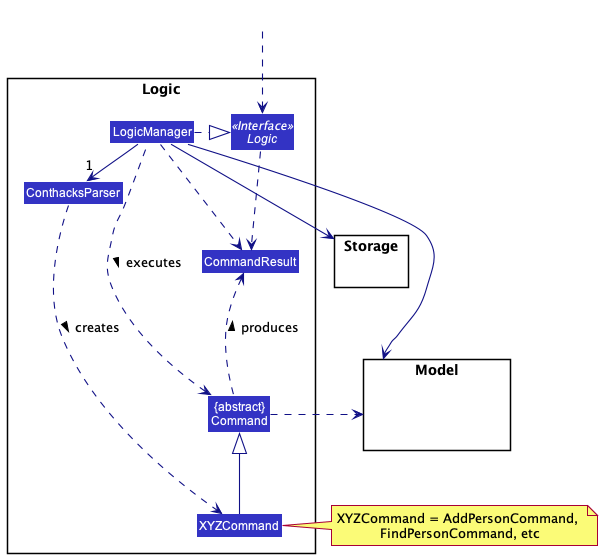
How the Logic component works:
- When
Logicis called upon to execute a command, it uses theConthacksParserclass to parse the user command. - This results in a
Commandobject (more precisely, an object of one of its subclasses e.g.,AddPersonCommand) which is executed by theLogicManager. - The command can communicate with the
Modelwhen it is executed (e.g. to add a person). - The result of the command execution is encapsulated as a
CommandResultobject which is returned back fromLogic.
The Sequence Diagram below illustrates the interactions within the Logic component for the execute("delete 1") API call.
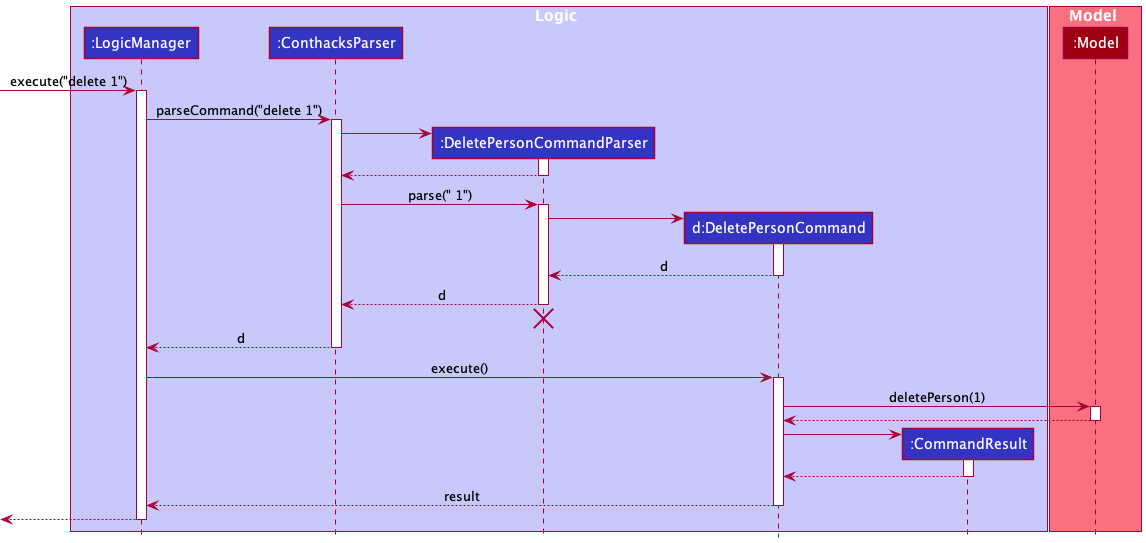
 Note: The lifeline for
 DeletePersonCommandParser should end at the destroy marker (X) but due to a limitation of PlantUML, the lifeline reaches the end of diagram.
Here are the other classes in Logic (omitted from the class diagram above) that are used for parsing a user command:
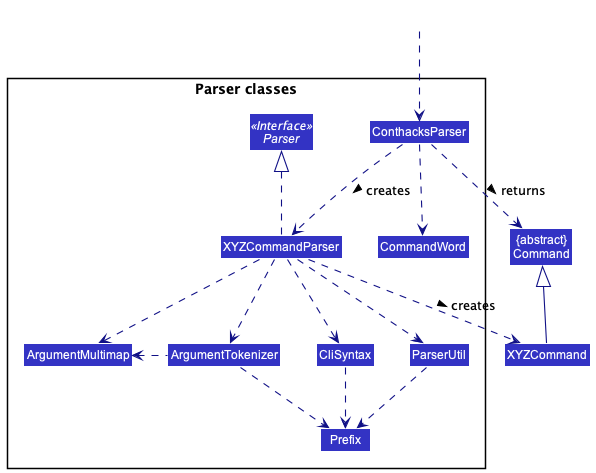
How the parsing works:
- When called upon to parse a user command, the
ConthacksParserclass usesCommandWordto find out whichCommandthe user wants.ConthacksParserthen creates the requiredXYZCommandParser(XYZis a placeholder for the specific command name e.g.,AddPersonCommandParser) which uses the other classes shown above to parse the user command and create aXYZCommandobject (e.g.,AddPersonCommand) which theConthacksParserreturns back as aCommandobject. - All
XYZCommandParserclasses (e.g.,AddPersonCommandParser,DeletePersonCommandParser, …) inherit from theParserinterface so that they can be treated similarly where possible e.g, during testing.
Model component
API : Model.java
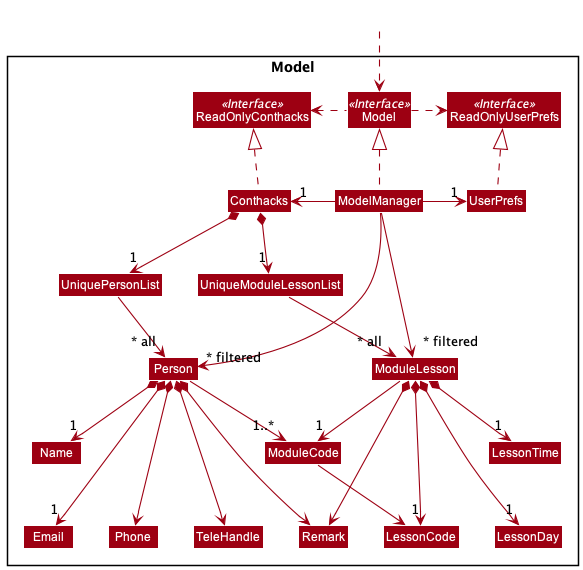
The Model component,
- stores contHACKS data i.e., all
PersonandModuleLessonobjects (which are contained in aUniquePersonListandUniqueModuleLessonListobject respectively). - stores the currently ‘selected’
PersonandModuleLessonobjects (e.g., results of a search query) as a separate filtered list which is exposed to outsiders as an unmodifiableObservableList<Person>andObservableList<ModuleLesson>that can be ‘observed’ e.g. the UI can be bound to those lists so that the UI automatically updates when the data in the lists change. - stores a
UserPrefobject that represents the user’s preferences. This is exposed to the outside as aReadOnlyUserPrefobjects. - does not depend on any of the other three components (as the
Modelrepresents data entities of the domain, they should make sense on their own without depending on other components)
Storage component
API : Storage.java
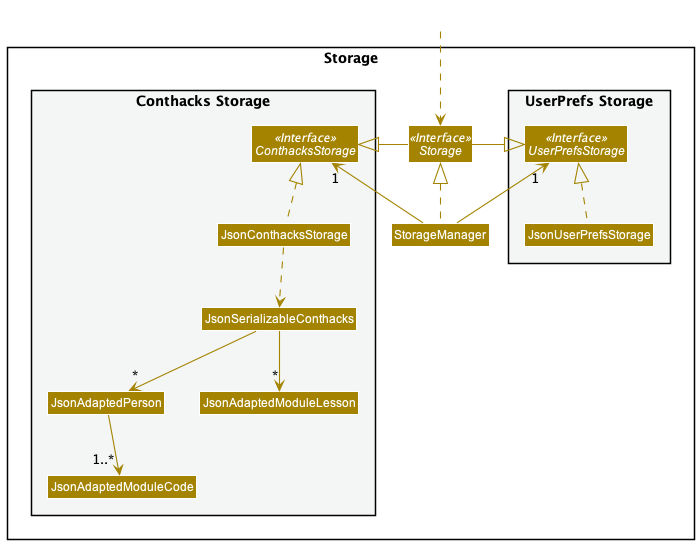
The Storage component,
- can save both contHACKS data and user preference data in json format, and read them back into corresponding objects.
- inherits from both
ConthacksStorageandUserPrefStorage, which means it can be treated as either one (if only the functionality of only one is needed). - depends on some classes in the
Modelcomponent (because theStoragecomponent’s job is to save/retrieve objects that belong to theModel)
Common classes
Classes used by multiple components are in the seedu.address.commons package.
Implementation
This section describes some noteworthy details on how certain features are implemented.
Add feature (With ModuleCode)
The add feature allows user to add a Person or ModuleLesson into contHACKS. Both Person and ModuleLesson contains the member ModuleCode. This section elaborates on the implementation of ModuleCode and how it affects the add feature.
About ModuleCode
ModuleCode is one of the parameters that must be included when adding a Person or ModuleLesson. ModuleCode contains the following members:
public final String value;
public final Set<LessonCode> lessonCodes;
The value refers to the module code of a NUS module e.g. "CS2100".
LessonCode also has a value that refers to the code of the lesson: tutorials, labs, sectionals, etc e.g. "T12"
ModuleCode has a set of LessonCode because a module in NUS can indeed have many lessons.
Note:
There is a need to associate LessonCode with ModuleCode as we need to be able to identify which ModuleCode a LessonCode belongs to.
Implementation
There are some distinctions between a Person and ModuleLesson. A Person can have many ModuleCode, with each ModuleCode having multiple LessonCode while a ModuleLesson lesson can only have one ModuleCode, with that ModuleCode having one LessonCode.
Implementation for adding Person
Since a Person can have many ModuleCode, an input like: add ... m/CS2100 T19 B04 m/CS2103T T09 is valid. The following sequence diagram shows how parsing the input add ... m/CS2100 T19 B04 m/CS2103T T09 works successfully to return a AddPersonCommand:
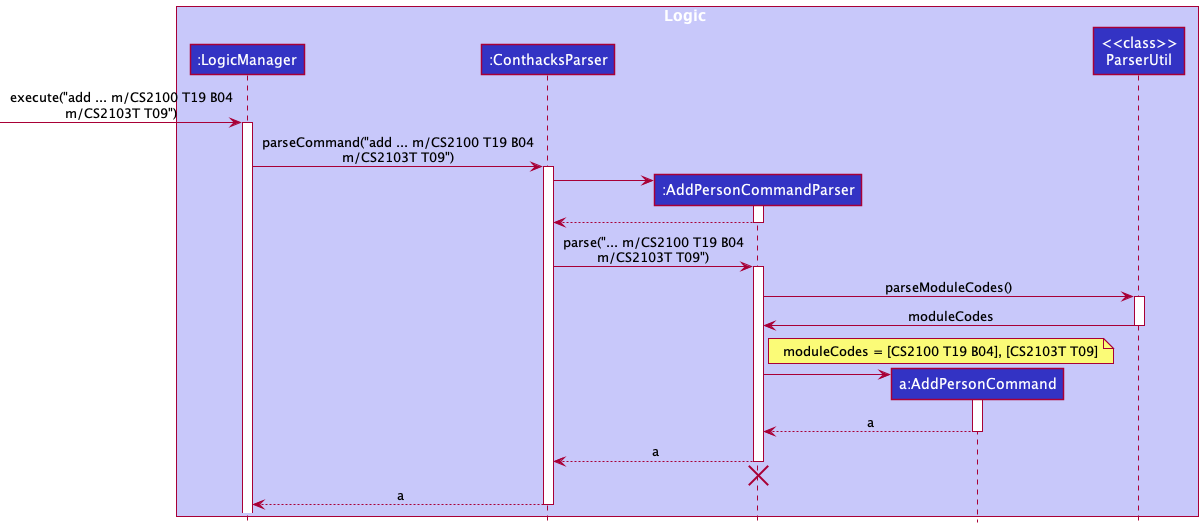
Notice that the AddPersonCommandParser uses the method parseModuleCodes() to get a collection of ModuleCode.
Implementation for adding ModuleLesson
Since a ModuleLesson can only have one ModuleCode and one LessonCode, we need a way to enforce lessonCodes.size() == 1 in ModuleCode. To achieve this, we only take the first LessonCode as the desired one. For example, the input addc ... m/CS2100 T19 B09 would take T19 as the LessonCode and ignore B09. On a similar note, to enforce having only one ModuleCode, we only consider the last occurrence of the parameter m/. For example, the input addc ... m/CS2103T B04 m/CS2100 T19 would only consider m/CS2100 T19 and ignore m/CS2103T B04. The following sequence diagram shows how parsing the input addc ... m/CS2103T B04 m/CS2100 T19 B09 works successfully to return a AddModuleLessonCommand despite the extra ModuleCode and LessonCode:
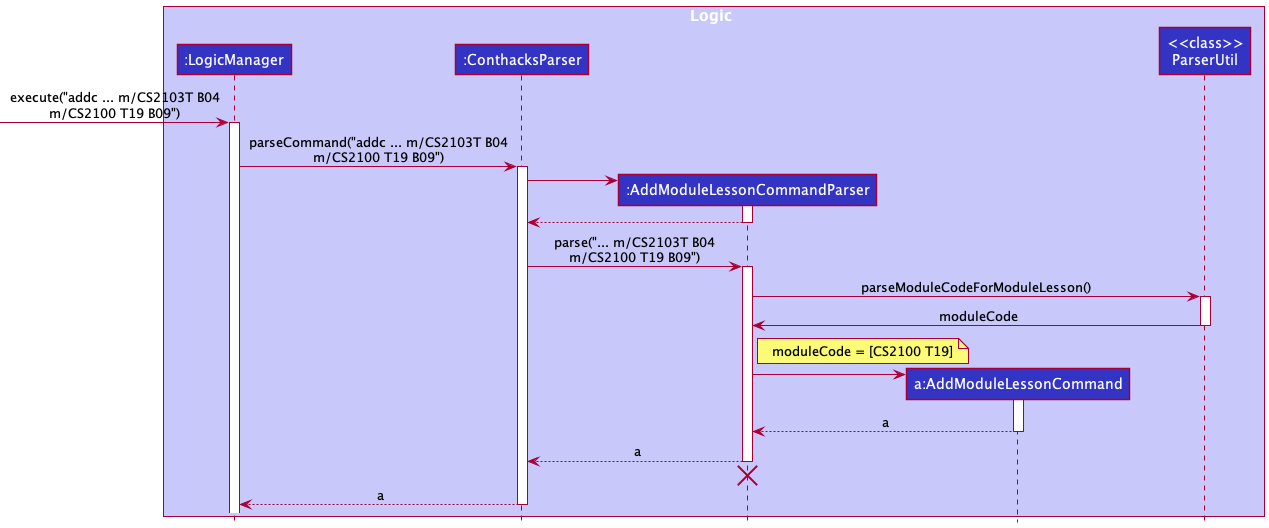
Notice that the AddModuleLessonCommandParser uses the method parseModuleCodeForModuleLesson() instead of parseModuleCodes() used by AddPersonCommandParser. This is where the distinction lies between adding Person and ModuleLesson with ModuleCode.
Design considerations:
Aspect: What should be associated with the ModuleCode:
-
Alternative 1 (initial idea): Have both
ModuleCodeandLessonCodebe standalone classes associate withPersonandModuleLesson.- Pros: Easier to implement
- Pros: Reduced coupling.
- Cons: Unable to tell which
ModuleCodeaLessonCodebelongs to when there are more than oneModuleCodeandLessonCode. Have to find another way to make the association which would introduce dependencies and remove the pros of reduced coupling.
-
Alternative 2 (current version): Have
ModuleCodebe associated with a set ofLessonCode- Pros: Able to tell which
ModuleCodeaLessonCodebelongs to - Pros: Some level of code reuse
- Cons: Have to introduce checks to ensure
ModuleCodeonly has oneLessonCodewhen it is a member ofModuleLesson
- Pros: Able to tell which
-
Alternative 3: Implement
ModuleCodeForPersonandModuleCodeForModuleLesson- Pros: No checks are required as
ModuleCodeForModuleLessoncan be implemented to only have oneLessonCode - Cons: Low level of code reuse
- Cons: Not extensible
- Pros: No checks are required as
Note:
The above information is also applicable for the edit feature.
Find feature
Users are able to execute a command to find an existing person in contHACKS. contHACKS will parse the find command for keywords, and filters the list of contacts to be displayed. Upon a successful search, the person card will be returned and listed in the GUI.
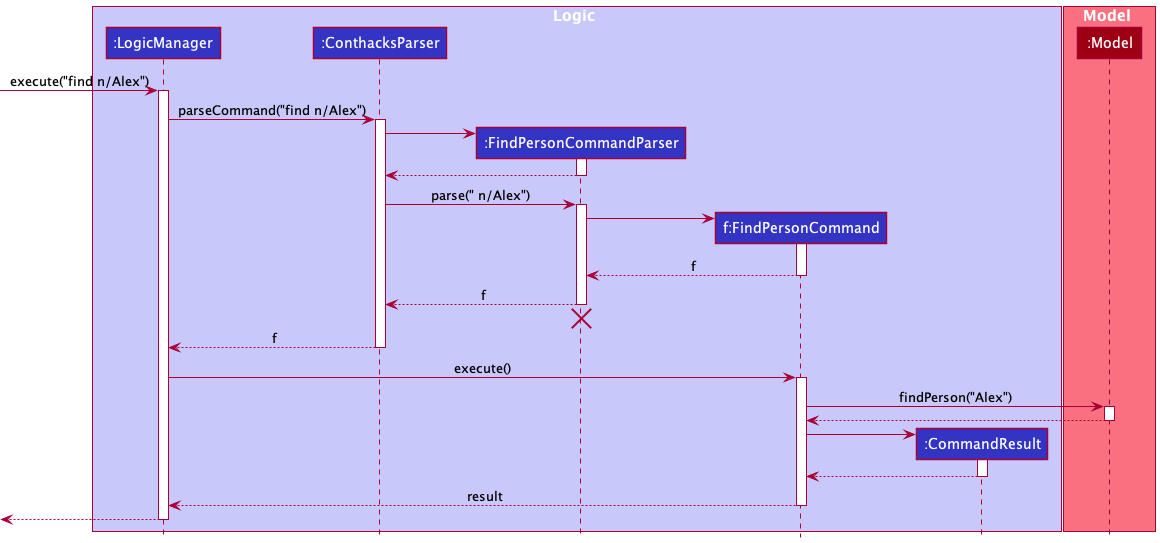
Implementation
The find command returns contacts that matches the input keywords. Initially, it only returns contacts that fully matches the keywords. Given the following example contact book:
- Contact #1: Jason
- Contact #2: Jasmine
- Contact #3: Bob
A search with the command find n/Jas would return nothing, as Jas is not a complete match with any of the names of the three contacts.
To better fit our target user, someone who wishes to work fast, we have decided to allow partial matches for the find command. This is done by altering the condition in the search predicate, from accepting full word matches to accepting even partial word matches:
return Arrays.stream(wordsInPreppedSentence).anyMatch(preppedWord::equalsIgnoreCase);
changed to
return Arrays.stream(wordsInPreppedSentence).anyMatch(x -> x.toLowerCase().contains(preppedWord.toLowerCase()));
Also, to facilitate filtered searches, we have implemented finding using prefixes:
-
find n/to find by name -
find m/to find by module code
Similar to other commands, this is done using a argumentTokenizer to parse for the above prefixes,
before the correct Predicate is instantiated and used for finding the contact.
Design considerations:
Aspect: Previous and current version of find command:
-
Alternative 1 (previous version): Search keyword needs to match entirely.
- Pros: Only the correct contact is returned.
- Cons: Takes time to type entire names to find the contact you want.
-
Alternative 2 (current version): Search keyword just needs to match partially.
- Pros: Faster searches with just partial keywords.
- Cons: Contacts you did not mean to retrieve are also displayed.
Delete contact by batch feature
Users are able to execute a command to delete an existing module code in contHACKS. Upon successful deletion of the module code, the module code will not exist in contHACKS thus all lesson codes, if any, under the module code will be deleted (module and lesson have a composition relationship). The particular contact will only be deleted from contHACKS if it is not attached to any other module code.
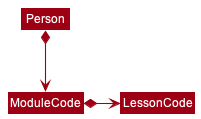
An input to delete by delete m/CS2103T would delete all contacts that are tagged to CS2103T. If a contact has another module code, it will only delete the module code CS2103T tag.
This is to better fit our target audience as once a class is no longer relevant, enabling a batch delete is quick and helps to keep contHACKS organised.
Implementation
DeletePersonCommand implements the execute() method from the Command abstract class whereby upon execution, the method will delete the respective contacts in the model’s list of contacts if a valid module code is provided.
This is how the DeletePersonCommand#execute() method works upon execution:
- The module code to be deleted is retrieved from the
DeletePersonCommandcreated. - All contacts with the module code will be retrieved from the model by
Model#updateFilteredPersonList()andModel#getFilteredPersonList(). - The module code is deleted by
DeletePersonCommand#deleteByModuleCode(). -
DeletePersonCommand#deleteByModuleCode()will callModel#deletePersonfor contacts with attached to the module code to delete only otherwiseDeletePersonCommand#deleteModuleCodeTagwill be called. - The deletion is successful and a CommandResult is returned with an appropriate success message to indicate that the deletion was successful via the CommandUtil#getCommandResult() method.
The following sequence diagrams show how the delete by module code feature works successfully, using the example command delete m/CS2103T:
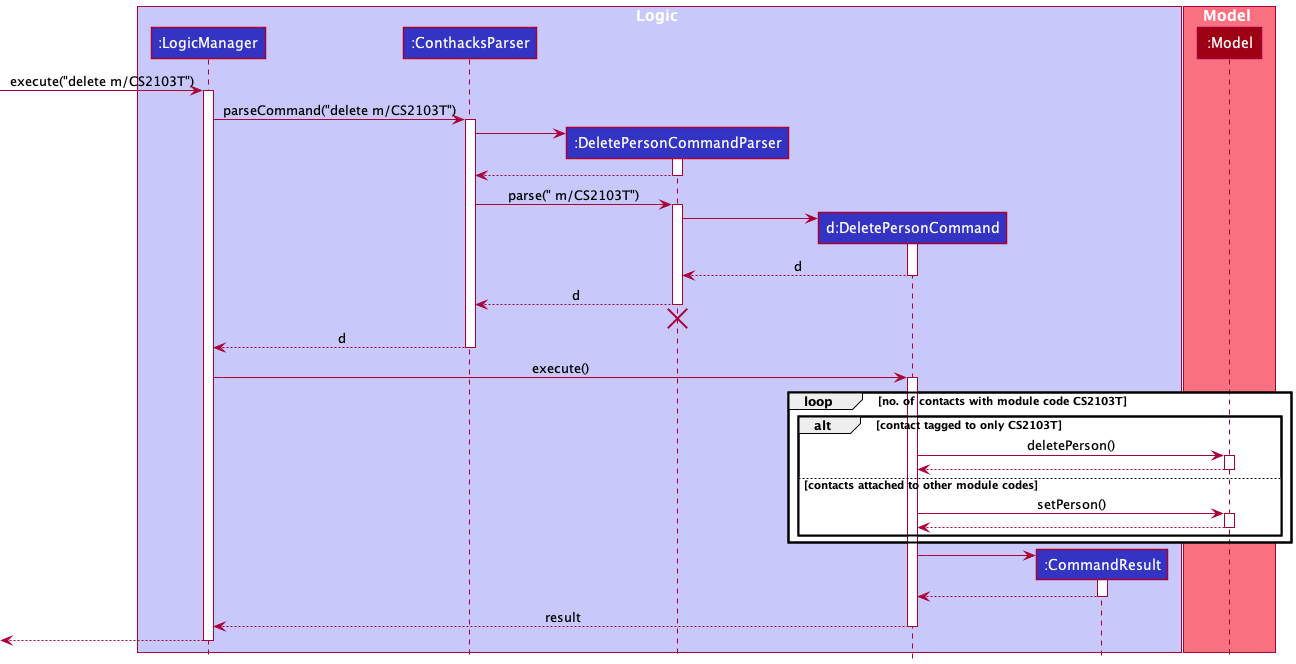
Note: The lifeline for DeletePersonCommandParser should end at the destroy marker (X) but due to a limitation of PlantUML, the lifeline reaches the end of diagram.
Design considerations:
Aspect: Previous and current version of delete command:
-
Alternative 1 (previous version): Delete only supports one deletion at a time.
- Pros: Deletes the particular intended contact.
- Cons: Takes time to delete multiple contacts, does not fit our target audience that wants operations to be fast.
-
Alternative 2 (current version): Delete supports batch deletion by module code as well.
- Pros: Faster deletion while still supporting deletion by one index.
- Cons: Not able to undo the deletion if the user deletes the wrong batch, it would take a long time to key all the information back in.
Note:
The above information is also applicable for the delete lesson by batch feature.
Aliases for different commands
Aliases are alternative words that you can use to perform the same command. There are a few default aliases provided for every command. Users can choose to use their most preferred alias to perform the command they want.
Implementation
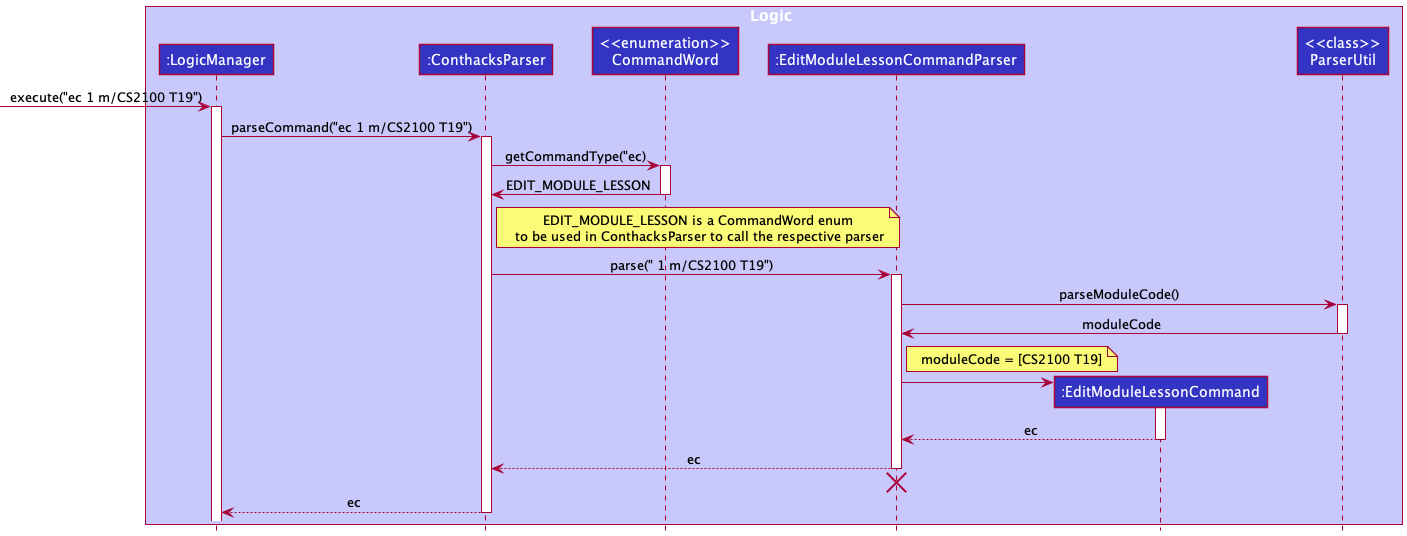
How the alias work is as such:
- When
Logicis called upon to execute a command, it calls theConthacksParserclass to parse the user command. - As
ConthacksParserparses the user command,ConthacksParserseparates thecommandWordstring from the rest of the arguments inside the user command string. -
ConthacksParserwill pass thiscommandWordstring intoCommandWordenum class which contains all the aliases for the different commands. Then,CommandWordwill check if thecommandWordstring is an alias for any of our implemented commands. - If the alias is a legitimate alias for any of the
XYZCommand,CommandWordclass will return the respectiveCommandWordenum back to ConthacksParser, and ConthacksParser will use this enum to call the respectiveXYZCommandParserto call and creates the respectiveXYZCommandobject.
The following sequence diagram show how the parsing of alias works, using the example ec 1 m/CS2100 T19
Aspect: Previous and current version of commandWord:
-
Alternative 1 (previous version): The
commandWordstring for aXYZCommandis stored as an attribute in theXYZCommandclass.- Pros: Simple implementation for
ConthacksParserto check whichXYZCommandParserto call. - Cons: Very difficult to add more
commandWordfor anyXYZCommand. If theXYZCommandhas multiple possiblecommandWord, we will need to add all to the attributes ofXYZCommandand checking one by one is very difficult.
- Pros: Simple implementation for
-
Alternative 2 (current version): Shift all the
commandWordstring of everyXYZCommandinto aCommandWordenum class. One enum in theCommandWordcan contains multiplecommandWordstring.- Pros: Easy to add a new alias (new commandWord) for any of the command.
- Cons: The implementation is more complex than alternative 1.
Documentation, logging, testing, configuration, dev-ops
Appendix: Requirements
Product scope
Target user profile:
- NUS student
- Tech savvy and familiar with command line interface
- Is a Teaching Assistant (TA)
- Does not have much time and wants to manage student contacts and classes efficiently without hassle
Value proposition:
Manage contacts faster than a typical mouse/GUI driven app with a categorisation ability and streamlined creation/reading/updating/deletion processes.
User stories
Priorities: High (must have) - * * *, Medium (nice to have) - * *, Low (unlikely to have) - *
| Priority | As a … | I want to … | So that I can… |
|---|---|---|---|
* * * |
user | have access to a help page | know how to navigate the app |
* * * |
user | be able to create a new contact in contHACKS | save a contact |
* * * |
user | be able to find an existing contact in contHACKS | retrieve details about the contact |
* * * |
user | be able to update an existing contact in contHACKS | change information about my student if I made a mistake when adding them |
* * * |
user | be able to delete an unwanted contact in contHACKS | delete contacts whom I am not in contact with anymore |
* * * |
user | be able to see their contact details | refer the contact details to contact them |
* * |
user | be able to purge all current data | get rid of sample/experimental data I used for exploring the app |
* * |
user | be able to view my contacts in alphabetical order | see the contacts in more intuitive way |
* * |
user | be able to delete by module | delete all contacts linked to that module |
* * |
user | be able to delete contacts by groups | delete many contacts in one go |
* * |
user | be able to see the group a contact belongs to | know which lesson this person belongs to |
* * |
user | be able to search for contacts | save time have to scroll the entire contact list |
* * |
user | be able to retrieve data fast | get the contact in the fastest time possible |
* * |
user | be able to search by categories | ignore unrelated contacts |
* * |
user | be able to add a description about a contact | add more details about the contact |
* * |
user | be able to create a class card | see my current classes |
* * |
user | be able to see class details | recall the specifics of the class |
* * |
user | be able to update class details | ensure my class details are correct |
* * |
user | be able to delete a class | remove the classes that are irrelevant |
* |
expert user | be able to set up my own aliases | use the alias that I am more comfortable with |
Use cases
(For all use cases below, the System is contHACKS and the Actor is the user, unless specified otherwise)
Use case UC01: Adding a contact
MSS
- User requests to create a contact and inputs contact details
- contHACKS creates the contact and displays information of the newly added contact
Use case ends.
Extensions
- 1a. User fails to provide any of the compulsory fields
- 1a1. contHACKS shows an error message
Use case ends.
- 1a1. contHACKS shows an error message
- 1b. User inputs details in a wrong format
- 1b1. contHACKS shows an error message
- 1b2. User enters new input
Steps 1b1 - 1b2 are repeated until the input is in a correct format.
Use case resumes from step 2.
Use case ends.
- 1b1. contHACKS shows an error message
- 1c. User inputs details with the same email/phone number/telegram handle as another existing contact in contHACKS.
- 1c1. contHACKS disallow this operation and shows an error message
- 1c2. User enters new input
Steps 1c1 - 1c2 are repeated until the email/phone number/telegram handle is unique in the list of contacts.
Use case ends.
- 1c1. contHACKS disallow this operation and shows an error message
Use case UC02: Finding a contact
MSS
- User requests to find a contact based on input details
- contHACKS shows a list of contacts that matches the input details
Use case ends.
Extensions
- 1a. There are no contacts that matches the input details
- 1a1. contHACKS displays an empty list
Use case ends.
- 1a1. contHACKS displays an empty list
- 1b. User finds by name
- 1b1. contHACKS displays a list of contacts with names that match the input
Use case ends.
- 1b1. contHACKS displays a list of contacts with names that match the input
- 1c. User finds by module code
- 1c1. contHACKS displays a list of contacts that are tagged with the module code
Use case ends.
- 1c1. contHACKS displays a list of contacts that are tagged with the module code
- 1d. User inputs details in a wrong format
- 1d1. contHACKS shows an error message
- 1d2. User enters new input
Steps 1d1 - 1d2 are repeated until the input is in a correct format.
Use case resumes from step 2.
Use case ends.
- 1d1. contHACKS shows an error message
Use case UC03: Editing a contact
MSS
- User requests to update a specific contact and inputs the new contact details
- contHACKS updates the contact with the input details and displays the updated contact
Use case ends
Extensions
- 1a. Contact does not exist
- 1a1. contHACKS shows an error message
Use case ends.
- 1a1. contHACKS shows an error message
- 1b. User inputs details in a wrong format
- 1b1. contHACKS shows an error message
- 1b2. User enters new input
Steps 1b1 - 1b2 are repeated until the input is in a correct format.
Use case resumes from step 2.
Use case ends.
- 1b1. contHACKS shows an error message
- 1c. User inputs email/phone/number/telegram handle as another existing contact in contHACKS
- 1c1. contHACKS disallows this operation and shows an error message
Use case ends.
- 1c1. contHACKS disallows this operation and shows an error message
Use case UC04: Deleting contact(s)
MSS
- User requests to list all contacts (
UC05) or find contacts (UC02) - User requests to delete specific contact(s) in the shown list
- contHACKS deletes the contact(s) and displays the updated contact list
Use case ends.
Extensions
- 1a. Contact does not exist
- 1a1. contHACKS shows an error message
Use case ends.
- 1a1. contHACKS shows an error message
- 1b. The index provided is invalid
- 1b1. contHACKS displays an invalid index error message.
Use case ends.
- 1b1. contHACKS displays an invalid index error message.
Use case UC05: Listing the contact list
MSS
- User requests to list the whole contact list
- contHACKS displays the whole contact list
Use case ends.
Use case UC06: Clearing all contacts
MSS
- User requests to clear all contacts
- contHACKS deletes all the contacts and displays an empty contact list
Use case ends.
Use case UC06: Adding a lesson
MSS
- User requests to create a lesson and inputs lesson details
- contHACKS creates the lesson and displays information of the newly added lesson
Use case ends.
Extensions
- 1a. User fails to provide any of the compulsory fields
- 1a1. contHACKS shows an error message
Use case ends.
- 1a1. contHACKS shows an error message
- 1b. User inputs details in a wrong format
- 1b1. contHACKS shows an error message
- 1b2. User enters new input
Steps 1b1 - 1b2 are repeated until the input is in a correct format.
Use case resumes from step 2.
Use case ends.
- 1b1. contHACKS shows an error message
- 1c. User inputs details with the same module code and lesson code as another existing lesson in contHACKS.
- 1c1. contHACKS disallow this operation and shows an error message
- 1c2. User enters new input
Steps 1c1 - 1c2 are repeated until module code/lesson code is unique in the list of lessons.
Use case ends.
- 1c1. contHACKS disallow this operation and shows an error message
Use case UC07: Finding a lesson
MSS
- User requests to find a lesson based on input details
- contHACKS shows a list of lessons that matches the input details
Use case ends.
Extensions
- 1a. There are no lessons that matches the input details
- 1a1. contHACKS displays an empty list
Use case ends.
- 1a1. contHACKS displays an empty list
- 1b. User finds by module code
- 1b1. contHACKS displays a list of lessons that are tagged with the module code
Use case ends.
- 1b1. contHACKS displays a list of lessons that are tagged with the module code
- 1c. User finds by day
- 1c1. contHACKS displays a list of lessons that are on this day
- 1d. User inputs details in a wrong format
- 1d1. contHACKS shows an error message
- 1d2. User enters new input
Steps 1d1 - 1d2 are repeated until the input is in a correct format.
Use case resumes from step 2.
Use case ends.
- 1d1. contHACKS shows an error message
Use case UC08: Editing a lesson
MSS
- User requests to update a specific lesson and inputs the new lesson details
- contHACKS updates the lesson with the input details and displays the updated lesson
Use case ends.
Extensions
- 1a. Lesson does not exist
- 1a1. contHACKS shows an error message
Use case ends.
- 1a1. contHACKS shows an error message
- 1b. User inputs details in a wrong format
- 1b1. contHACKS shows an error message
- 1b2. User enters new input
Steps 1b1 - 1b2 are repeated until the input is in a correct format.
Use case resumes from step 2. Use case ends.
- 1b1. contHACKS shows an error message
- 1c. User inputs module code and lesson code that is the same as another existing lesson in contHACKS
- 1c1. contHACKS disallows this operation and shows an error message
Use case ends.
- 1c1. contHACKS disallows this operation and shows an error message
Use case UC09: Deleting lesson(s)
MSS
- User requests to list all lessons (
UC10) or find lessons (UC07) - User requests to delete specific lesson(s) in the shown list
- contHACKS deletes the lesson(s) and displays the updated lesson list
Use case ends
Extensions
- 1a. Lesson does not exist
- 1a1. contHACKS shows an error message
Use case ends.
- 1a1. contHACKS shows an error message
- 1b. The index provided is invalid
- 1b1. contHACKS displays an invalid index error message.
Use case ends.
- 1b1. contHACKS displays an invalid index error message.
Use case UC10: Listing the lesson list
MSS
- User requests to list the whole lesson list
- contHACKS displays the whole lesson list
Use case ends.
Use case UC11: Clearing all lessons
MSS
- User requests to clear all lessons
- contHACKS deletes all the lessons and displays an empty lesson list
Use case ends.
Use case UC12: Accessing help manual
MSS
- User requests for a help manual
- contHACKS displays the help manual
Use case ends.
Use case UC13: Exiting the application
MSS
- User requests to exit the application
- contHACKS closes
Use case ends.
Non-Functional Requirements
- Should work on any mainstream OS as long as it has Java
11or above installed. - Should be able to hold up to 1000 persons without a noticeable sluggishness in performance for typical usage.
- A user with above average typing speed for regular English text (i.e. not code, not system admin commands) should be able to accomplish most of the tasks faster using commands than using the mouse.
- The user should have basic knowledge of the Command Line Interface to operate the application smoothly.
- Should be able to hold more than 100 contacts with no noticeable drop in performance.
Glossary
- Mainstream OS: Windows, Linux, Unix, OS-X
Appendix: Instructions for manual testing
Given below are instructions to test the app manually.
Note: These instructions only provide a starting point for testers to work on;
testers are expected to do more exploratory testing.
Launch and shutdown
-
Initial launch
-
Download the jar file and copy into an empty folder
-
Double-click the jar file Expected: Shows the GUI with a set of sample contacts. The window size may not be optimum.
-
-
Saving window preferences
-
Resize the window to an optimum size. Move the window to a different location. Close the window.
-
Re-launch the app by double-clicking the jar file.
Expected: The most recent window size and location is retained.
-
Adding a person
-
Prerequisites: None.
-
Test case:
add n/Ben e/ben@example.com m/CS2103T T11 B04 p/9123456 h/@Benny
Expected: The person with the fields entered should be added into the contact list panel. The module codeCS2103T [T11 B04]should be rendered. -
Test case:
add n/Casey e/casey@example.com m/CS2103T p/81234567 h/@caaaasey
Expected: The person with the fields entered should be added into the displayed contacts. The module codeCS2103Tshould be rendered. -
Incorrect
addcommand to try:add add n/Ben e/ben@example.com m/CS2103T T11 B04 p/9123456 h/@Benny
Expected: No person is added because theaddcommand is provided twice.
Adding a lesson
-
Prerequisites: None.
-
Test case:
addc m/CS2103T T12 d/4 t/09:00 10:00 r/Online
Expected: The lesson with the fields entered would be added into the lesson list panel. -
Incorrect
addccommand:addc addc addc m/CS2103T T12 d/4 t/09:00 10:00
Expected: No lesson is added because theaddccommand is provided twice.
Finding a person
-
Prerequisites: There exists a contact named
Alex Yeohin the contact list, and noAlexanderexists in the contact list. -
Test case:
find n/le Y
Expected: Contact with nameAlex Yeohis listed. -
Test case:
find n/alexander
Expected: No contact is listed. No error is shown. -
Incorrect find commands to try:
find,find alex,find n/
Expected: No contact is listed. Error details shown in the result display. Text in the command box turns red.
Finding a lesson
-
Prerequisites: There exists a lesson with module code
CS1231in the contact list, and noCS1231Sexists in the contact list. -
Test case:
findc m/S123
Expected: Lesson with module codeCS1231is listed. -
Test case:
findc m/cs1231s
Expected: No lesson is listed. No error is shown. -
Incorrect find commands to try:
findc,findc cs1231,findc m/
Expected: No contact is listed. Error details shown in the result display. Text in the command box turns red.
Editing a person
-
Prerequisites: The person must exist in contHACKS and can be accessed via a valid index.
-
Test case:
edit 1 n/John Doe
Expected: The name of the first person shown in contHACKS will be changed toJohn Doe -
Test case:
edit -1 n/John Doe
Expected: No person is edited. Error details shown in the result display. Text in the command box turns red.
Editing a lesson
-
Prerequisites: The lesson must exist in contHACKS and can be accessed via a valid index.
-
Test case:
editc 1 d/3
Expected: The day of the first lesson shown in contHACKS will be changed toWednesday -
Test case:
editc -1 d/3
Expected: No lesson is edited. Error details shown in the result display. Text in the command box turns red.
Deleting a person
-
Prerequisites: List all persons using the
listcommand. Multiple persons in the list. -
Test case:
delete 1
Expected: First contact is deleted from the list. Details of the deleted contact shown in the result display. -
Test case:
delete 0
Expected: No person is deleted. Error details shown in the result display. Text in the command box turns red. -
Other incorrect delete commands to try:
delete,delete x(where x is larger than the list size)
Expected: Similar to previous.
Deleting a lesson
-
Prerequisites: List all lessons using
listccommand . Multiple lessons in the list. -
Test case:
deletec 1
Expected: First lesson is deleted from the list. Details of the deleted lesson shown in the result display. -
Test case:
deletec 0
Expected: No lesson is deleted. Error details shown in the result display. Text in the command box turns red. -
Other incorrect delete commands to try:
deletec,deletec x(where x is larger than the list size)
Expected: Similar to previous.
Saving data
-
Dealing with missing/corrupted data files
-
Go to
conthacks.jsonunder thedatafolder and add random symbols to anymoduleCodefields. This is to corrupt the current save file. -
Double-click the jar file Expected: Shows the GUI with no data.
-
Delete the
conthacks.jsonfile under thedatafolder. -
Double-click the jar file Expected: Shows the GUI with newly populated sample data.
-